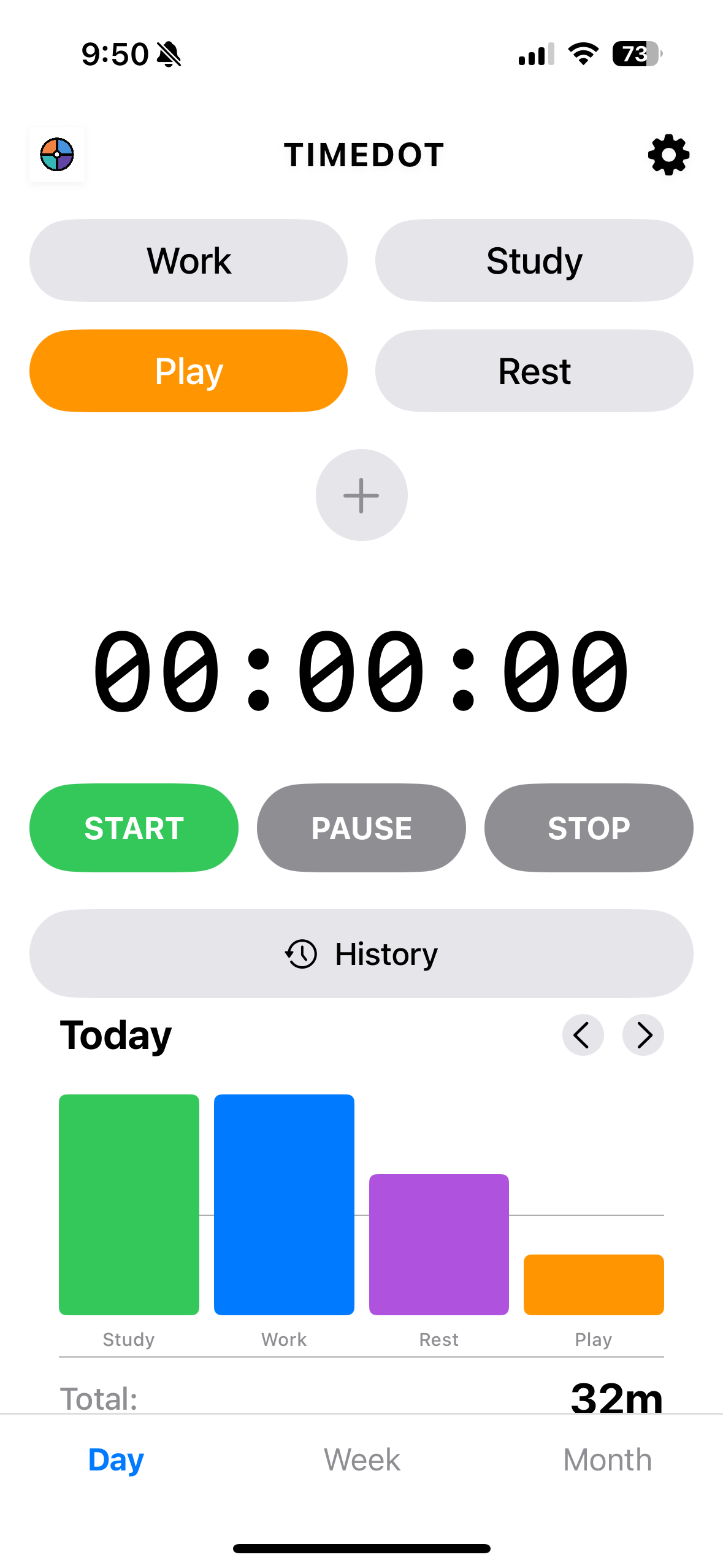
TimeDot is a minimalist time tracker for your whole day — not just work. Toggle between Work, Study, Play, and Rest to see how you really spend your hours.
Download on the App StoreFree download · No account required · Works offline
Most timer apps only care about "productive" time. TimeDot tracks every kind of time — because balance matters as much as hustle.
Track professional tasks, meetings, deep work sessions, and freelance hours.
Monitor study sessions, exam prep, course work, and learning goals.
Log hobbies, gaming, creative projects, and recreational activities.
Record downtime, meditation, naps, and recovery breaks to prevent burnout.
Everything you need to understand your daily rhythm. Nothing you don't.
Start tracking instantly. Switch modes with a single tap. No setup, no projects to configure.
Visual breakdowns of where your time went. Spot patterns and make better decisions.
Gentle reminders when you've been in one mode too long. Prevent burnout before it starts.
Clean, minimal interface that helps you focus. No ads, no social features, no noise.
No internet required. No account needed. Your data stays on your device, always.
See the ratio of work vs. rest vs. play over time. Understand if your life is in balance.
A timer that respects your focus. No clutter, no ads, no unnecessary complexity.
TimeDot is designed for individuals who want life-balance awareness — not another billing tool.
| Feature | TimeDot | Forest | Toggl Track | Clockify |
|---|---|---|---|---|
| Life-balance modes (Work/Study/Play/Rest) | ✓ | ✗ | ✗ | ✗ |
| Minimalist, distraction-free UI | ✓ | ✓ | ✗ | ✗ |
| No account required | ✓ | ✗ | ✗ | ✗ |
| Productivity summaries & analytics | ✓ | ✓ | ✓ | ✓ |
| Background burnout alerts | ✓ | ✗ | ✗ | ✗ |
| Free core features | ✓ | Paid (iOS) | ✓ | ✓ |
| Works completely offline | ✓ | ✓ | ✗ | ✗ |
| Designed for personal use (not teams) | ✓ | ✓ | ✗ | ✗ |
Whether you're a student cramming for exams, a remote worker managing focus, or someone rediscovering rest — TimeDot adapts to your life.
Track study hours vs. breaks. See weekly patterns. Build better focus habits before exam season hits. TimeDot works as a simple study timer and habit tracker in one.
When home is your office, boundaries blur. TimeDot helps freelancers and remote employees see exactly how much they're working — and whether they're resting enough.
If you care about mindfulness and burnout prevention, TimeDot's Rest mode and balance insights give you the awareness most productivity apps ignore.
Yes! TimeDot is free to download and use on iOS. Core features including the timer, mode switching, and daily summaries are all available at no cost.
Absolutely. TimeDot's Study mode is designed for focused learning sessions. Track how long you study each day, week, or month, and set background reminders to take breaks and avoid burnout.
Unlike Toggl (built for teams and billing) or Forest (focused on blocking distractions), TimeDot tracks your entire day across four life categories: Work, Study, Play, and Rest. It gives you a holistic view of how you spend your time without unnecessary complexity.
Yes — that's exactly what it's designed for. By tracking time across Work, Study, Play, and Rest, you can see exactly where your hours go and make adjustments to prevent burnout and improve your quality of life.
Absolutely. TimeDot serves as a simple time tracker ideal for freelancers managing multiple projects. Use Work mode for client tasks and switch to other modes when you're off the clock.
Yes. TimeDot works great as a habit tracker for maintaining focus and building routines. Track daily consistency across all four modes and use weekly summaries to stay on track.
Free download. No account. No ads. Just clarity.
Download TimeDot Free